Free native Markdown editor for Mac
One file, one window, and a page worth looking at.
Open the .md files you already have. Lede keeps the punctuation quiet while you write, then renders the same file when you read. No account, no library and never a subscription.
This page is a Markdown file. Write shows it the way Lede does while you type, Read renders it, and Source shows the file exactly as it is. Pick a page colour while you are there.
Write the Markdown. Read the document.
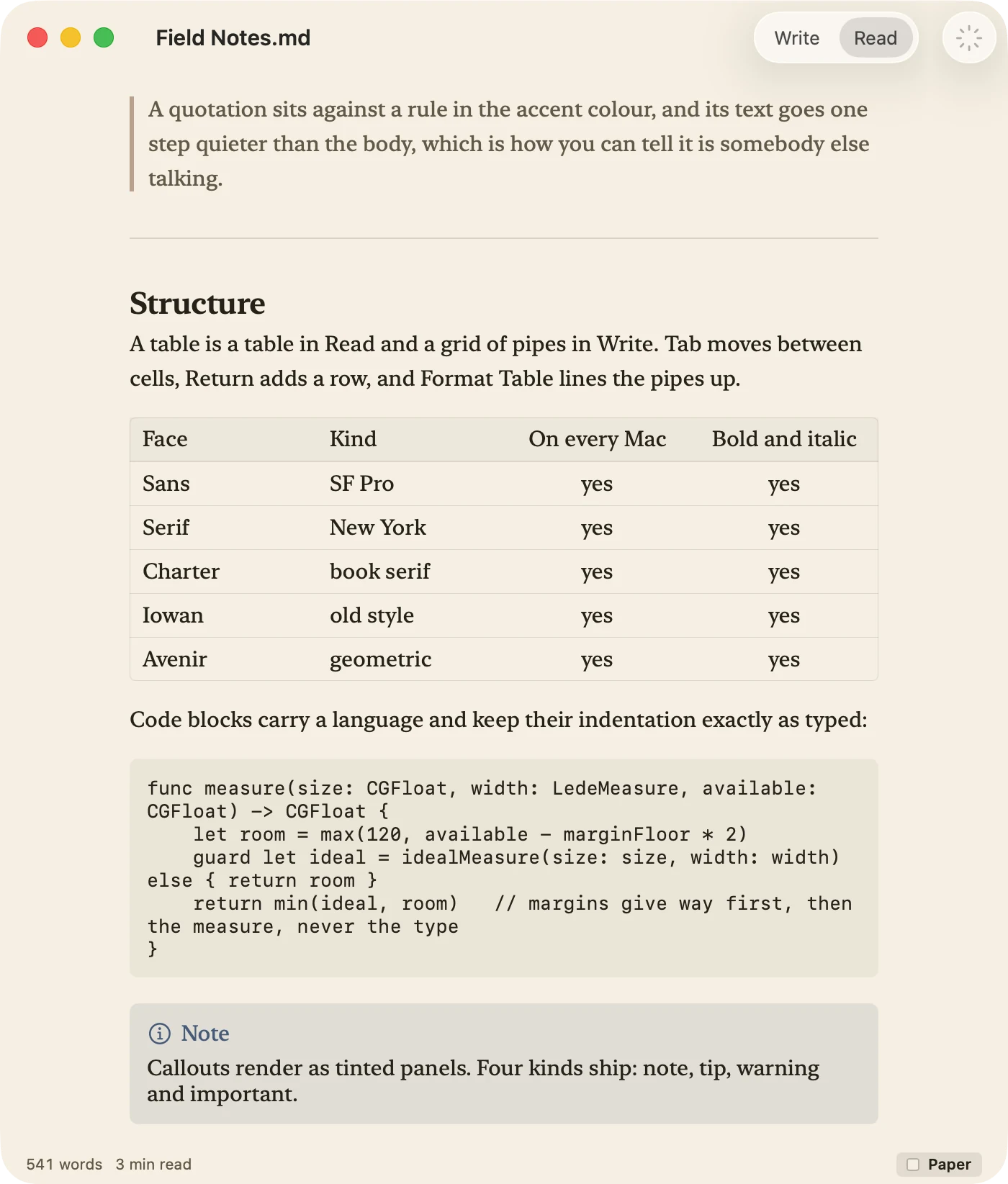
Write looks like the finished page: the marks stay out of sight, tables are a grid, and equations and diagrams are drawn in place, without moving the words under your cursor. Read is the same page with nothing to edit. The picture below is the app, in the same view and page colour as this page.

Stay with the sentence
Press Shift-Command-F and the window closes in around your text. Everything but the sentence you are writing steps back, and Typewriter Mode holds your line in the middle while the page glides under it. Escape brings it all back. Dim and Typewriter have their own switches, in the Aa menu and in View > Writing Options, both off until you want them.
Writing aids: a second reader, built in
Writing aids are off until you want them: Option-Shift-Command-D, or Settings > Writing Aids. They mark the draft in Write and leave Read clean. Switch on the checks you want: filler, redundancy, clichés, complex words, long sentences, possible passive voice, adverbs, repeated words, and patterns of your own. Marks sit over the text and explain themselves when you point at them. Plainer words are offered where Lede has one, and Ignore Here or Always Ignore keeps your voice in charge.
Sentence rhythm tints each sentence by its length so you can see the beat of a paragraph. Nothing is written into the file, quoted text is left alone unless you ask, and every check runs on your Mac.
It is really very easy to utilise the longest word you know. Nobody minds. Then the paragraph goes on for a while, adding one more clause and another after that, until the point you set out to make has been made, put down and picked up again at the end of the day. Short again.
A caret that feels like yours
A line, a block or an underline, in three thicknesses, steady, smooth or not blinking at all. Five colours for each page, so the caret you choose on Black is cut for Black rather than borrowed from another page.
The page waits where you left it
Everything a draft needs. Nothing to manage.
- Give the draft structure. Find and Replace, six heading levels, pictures, maths and tables are ready when you need them. Paste cells from Numbers or Excel, then move rows and columns in place.
- Send the finished document. Read draws the tables, callouts, Mermaid diagrams and LaTeX maths. The same rendering goes to PDF, standalone HTML, print and rich text on the clipboard.
- Get a second reader. Writing aids mark filler, clichés, long sentences, possible passive voice and more as you write, and explain each mark when you point at it. Nothing is written into the file.
- Know how far you have come. Set a word goal for the document and start a sprint against it. The status bar shows the reading time, and the goal is kept beside the app, never in your file.
- Fold what you are not writing. Fold Section hides a heading's text on screen with Option-Command-[. The file is never changed, and Unfold All brings everything back.
- Book Paragraphs. A first-line indent, blank lines closed up and scene breaks centred, as the page looks. Turn it off and the Markdown is what you typed.
- Vim keys, if you want them. Normal, insert and visual modes, with the mode in the status bar. Off by default, one switch in Settings > General.
It keeps up with a file that is still being written
Open a log, report, plan or README while another app or an AI tool is writing it. Lede reloads each save, and follows the file when you are already at the end. If you have unsaved text of your own, it copies the other version aside first and asks in a bar over the page, so nothing is lost.
Mermaid diagrams are drawn in Write, Read and Quick Look. Copy as Rich Text moves the finished result into Mail or Docs without taking the Markdown syntax with it.
Garden plan
March
• Sow tomatoes indoors
• Order seed potatoes
April
• Plant the potatoes out
• Harden off the tomatoes
Your file stays a file
Lede edits the Markdown where you keep it. There is no import, database or private library. A file opened and saved without an edit comes back byte for byte unchanged.
Measured against the specifications’ own test suites and Lede’s round-trip file tests.
Lede on Windows, a preview
The same Write, Read and Source, one file in each window, for Windows 11. It is built on the system’s WebView2 rather than AppKit, and it is free in the same way: no account, nothing to buy, your .md file where you keep it.
Download for Windows (x64) 5.8 MB · Download for Windows on Arm 5.6 MB
This preview is not signed yet, so Windows may say “Windows protected your PC” the first time. Choose More info, then Run anyway. It installs for you alone, in your user folder, and Settings > Apps removes it. Version 0.1.0, SHA-256 x64 fc2c111799feed7b49189fffdf2ef3eab9dbbc88bb58d0361f2b4940516de30a, Arm 03c94ce6a71b3951f6787f0c237a177ecf8f7ea7c23637596cb6632ea145b530.
One file is the point
Lede opens one document in one window. For a folder of linked notes with search and backlinks, use Skein, which is free and contains the same editor. For page layout and a Word file at the end, use Verso. The full feature page explains where Lede stops and why.
Open one file. See if it is worth looking at.
Free · v1.0.24 · macOS 14 or later
v1.0.24 · 19.6 MB · Apple silicon and Intel
Last updated 22 November 2026 · 22 releases since launch · What’s new
Signed and notarised by Apple. Made by the people who make Skein. One developer, who answers email.